With the rise of information technology and general search engines, companies have implemented strategies to promote their products and services, thereby converting users who frequently search for information into potential customers. This has led companies to compete for positioning in the top results of these search engines. Google, the most popular search engine, has carried out such a successful positioning and recognition campaign that it has set trends and standards for website development within the framework of SEO, with the goal of achieving more advanced and accurate targeting and search of their content for audiences. Below, I will illustrate the appropriate strategies to increase this positioning.
1. Introduction
SEO (Search Engine Optimization) is the search engine optimization of websites through organic results. There are two types of SEO that we can apply:
- On-page SEO: This is everything you can do to improve SEO, which consists of optimization that you can perform directly on your website to achieve the desired result.
- Off-page SEO: This consists of optimization that you can perform from external sources to your website to position yourself in search engine results.
In this article, we’ll try to cover the most general aspects of on-page SEO.
2 Content
2.1 Optimize the information that describes your website
2.1.1 Research your keywords
In this post, we assume you have expertise in keyword research. However, this space will focus on providing you with in-depth knowledge of how to acquire your keywords. Here, we’ll cover very general aspects.
It’s essential that you know who your content, product, or service is aimed at. For this, the best ally is the search engine itself, since the autocomplete feature allows you to define your keywords and put you in the shoes of your consumer who isn’t familiar with your brand.
For example, to offer computer equipment, we can consult the search engine to find out what the autocomplete suggests.
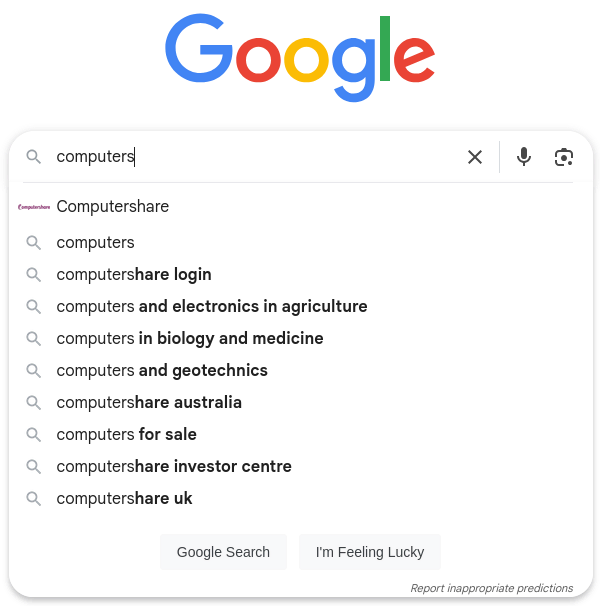
From here, we can gain highly relevant information for our business idea:
- We can eliminate the “computers for education” search result from our search options, as it is a government program in the country where I am currently located.
- From the other results, we can see that HP is the only brand that stands out, so it is essential to stock computers primarily from this brand.
- Likewise, large chain stores such as Exito, Alkosto, and Jumbo are the main competitors, so it is possible to analyze their added value for this specific niche.
- Searches for laptops are more common than desktop computers. This gives us an idea of the relevance of products to stock.
- It is also important to know the specific location of the search. Google has segmented my location so well that it places the strongest competitors in the region where I am located at the top of the search results.
This can give us an idea of what users search for most regarding computers. Try experimenting with more combinations to learn about the options autocomplete offers.
However, the search engine provides an idea of the keywords we can use to rank in SEO. This means we should adapt our titles and keywords to the most popular searches, and it also requires a more thorough keyword search for our website.
2.1.2 Use short and descriptive URLs
Let’s look at the effect that short URLs can have on people.
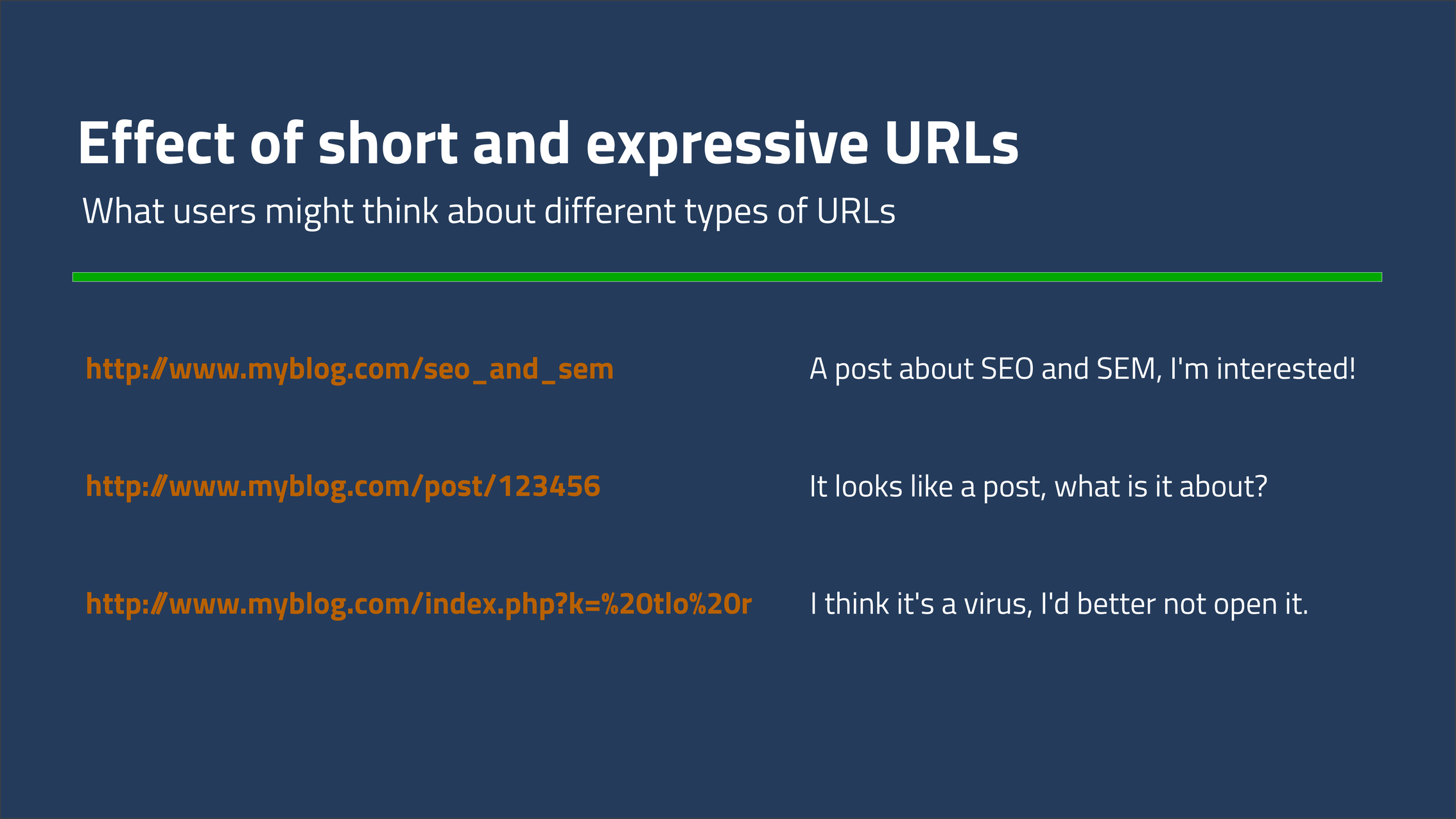
As you can see, short, descriptive URLs can make a better impression on the end user. They’re not just limited to the code, but also provide semantic value to the user and their needs, making them interested in the content itself.
2.1.3 Los meta-tags
Meta tags, also known as meta tags, as their name suggests, are meta-information that is not related to the content of a web page’s code, but that describes it to search engines and search engines to facilitate the indexing of sites.
Meta-tags must be placed in the HTML code within the tags <head>...</head>.
Finally! A little bit of code!
Below, I’ll list the meta tags that can help us with our SEO ranking.
2.1.3.1 title
Allows you to set the title of a web page, both for tabs in the web browser and for searching sites using search engines. It’s not a meta tag; however, it’s important for search engine indexing.
<head>
  ...
  <title>My awesome web page</title>
  ...
</head>
2.1.3.2 lang
Indicates the language of the website content
<head>
  ...
  <meta http-equiv="Content-Language" content="en,es">
  ...
</head>
2.1.3.3 charset
Specifies the character set that is written on the website.
<head>
  ...
  <meta charset = "utf-8">
  ...
</head>
2.1.3.4 http-eqiv
Defines the server’s interaction with incoming requests. For SEO purposes, it provides information on cache management and web browser compatibility.
<head>
  ...
  <meta http-equiv="X-UA-Compatible" content="IE=edge">
  ...
</head>
Here, we define that our website is compatible with Edge.
2.1.3.5 meta-tag attribute pairs: name - content
They specify another set of values that meta-tags have:
<head>
  ...
  <meta name="author" content="John Doe">
  <meta name="description" content="This is my awesome web page!!!">
  <meta name="keywords" content="keyword 1, keyword 2, keyword 3">
  <meta name="robots"  content="index,follow">
  <meta name="viewport" content="width=device-width, initial-scale=1.0, maximum-scale=1.0">
  ...
</head>
Next we will address in a general way, the definition of each of the meta-tags of the name parameter:
| Name attibute Meta-tag | Description |
|---|---|
| author | The author of the website |
| description | The description of the site |
| keywords (obsolete since 2009) | These are keywords that helped the search engine find pages in a certain section of content. However, since developers used them for spam or clickbait, Google has decided to ignore them since 2009 and focus on other details, which will be described below. |
| robots | Some definitions of what the search engine indexer should do with the page content; by default, it indexes and tracks all pages on the website. |
| viewport | Defines descriptions for how content is displayed for devices that can access the site's content. |
Warning: It is necessary to verify that your meta tags are spelled correctly. Tools such as the W3C Validator can help ensure that your website’s meta tags are spelled correctly, including validation points.
Furthermore, to better consider website indexing and relevance, avoiding problems with keyword abuse in meta tags, Google has decided to place special attention on searching for these keywords in an element that is king in internet searches. This element, described below, is content.
2.2 Optimize content
2.2.1 Content tags
This is the most important and crucial element when it comes to SEO positioning. You must carefully consider the content of your h1 tags and, in images, their descriptions using the alt parameter. These are the elements the search engine uses to filter your content. In other words: these elements are your new keywords, which, along with the meta description, were present in the head of your website.
You should also organize your content well from the remaining h<number> tags so that Google can correctly index your content.
2.2.2 Text reduction
It’s important to always write with your audience in mind. Keep your language simple, easy to read, and use short words. “Proximity” isn’t the same as “close.” The less you write to convey an idea, the better. It’s also important to review your HTML content and eliminate unnecessary content.
2.2.3 Velocidad de carga
Also, make sure your content loads quickly, Google has an excellent tool for measuring website loading called PageSpeed Insights or WebPageTest.
You can use excellent image compression tools like Riot. Also, try to render your audio and video in high-compression formats like MP3 or WebM.
There are many other elements that need to be taken into account to improve a website’s loading speed:
- Reduce the length of your HTTP requests.
- Minimize and combine files to improve your website’s responsiveness.
- Make asynchronous calls to your JavaScript and CSS files to improve response times due to user concurrency.
- If your project has separate front- and back-ends, check if the language supports asynchronous calls and implement them.
- Reduce DNS server response. If your DNS server takes too long to convert a URL into an IP address, then it’s time to consider a better provider for your site.
- Choose your hosting provider wisely. You have multiple options depending on your budget, such as:
- Shared hosting: where you share space and server resources.
- VPS hosting: where you share space but have a dedicated amount of resources for your website.
- Dedicated server: where you have the server at your disposal.
- Enable compression for your site’s pages, especially static pages.
- Enable page caching to ensure faster response times for data that is queried frequently.
2.2.4 Use Schema
Schema improves the visibility of your website by defining how it will appear in search engine SERP results. For example, you can use it to add rankings to Google search results. To implement this tool, you can go to the official documentation
2.2.5 Orient your design towards a responsive web design
With the rise of mobile devices, the vast majority of web searches are now performed using these devices. Your website needs to be responsive so it can adapt to your users’ needs when they access your content.
There are various web development frameworks such as Bootstrap that can help us convert our website into a responsive site for various screen sizes.
You can use Google’s Mobile Friendly Website Test Tool to make sure your content is, in fact, optimized for mobile.
3 Conclusions
We’ve reviewed some on-page SEO actions that can be carried out to improve your website’s ranking. These primarily focus on optimizing both the metadata and the content of your website. So, as long as Google maintains its leadership in web search engines, it’s important that we adapt to the options this platform offers. However, the content is what matters, so give your audience what they really want or need to see on your website.
Do you think we’ve missed something or think it’s necessary to delve deeper into a topic or illustrate a new theme? Let us know in the comments.